Here Is New Facebook Chat Trick
As You Know Facebook chat has the worst form of emoticons ?
So Now Here Is Trick By Which You can now make the profile pictures of Facebook users and
pages show up inside your chat windows. Now astonish your friends by inserting their smiley
How ?? Here Is A Sample
 Hmm As Simple As That :)
Still For Those Who Are Not Able To Understand From Picture
Here IS Detail Procedure
1)When You Are Chatting With Any Friend Just Do This Type This :
[[unique id or Username ]]
2)Press Enter Here Are Some Of Examples
Facebook : [[facebook]]
Google : [[google]]
Neway4U : [[Neway4U]]
Not bad Obama: [[169919399735055]]
Me Gusta: [[211782832186415]]
Mother of God: [[142670085793927]]
Cereal Guy: [[170815706323196]]
LOL Face: [[168456309878025]]
NO Guy: [[167359756658519]]
Yao Ming: [[218595638164996]]
Derp: [[224812970902314]]
Derpina: [[192644604154319]]
Forever Alone: [[177903015598419]]
Not Bad: [[NotBaad]]
Fuck yeah: [[105387672833401]]
Challenge accepted: [[100002727365206]]
Okay face: [[100002752520227]]
Dumb bitch: [[218595638164996]]
Poker face: [[129627277060203]]
Okay face: [[224812970902314]]
Socially awkward penguin: [[98438140742]]
Rage face: [[FUUUOFFICIAL]]
Lamp: [[100001256102462]]
No: [[167359756658519]]
MOG: [[142670085793927]]
Feel like a sir: [[168040846586189]]
3)So By Replacing ID And Usernames You Can Change Emoticons :)
Thats ALL !!
So I Hope Now You Can Express Yourself Fully On Facebook Chat :)
AND Plz Do Like US AND Comment Here !!
Now Blogspot Is Country Domain Specific !!

Just Click
http://neway4u.blogspot.com
And You Will Be Redifected to
http://neway4u.blogspot.in
So Now .Com Will Be Redirected To Your Country Domain :(
This change might have some impact on blog traffic as country specific domains appear more in local search. So if you blog had lot of global audience then you might see some drop in google search traffic.
So If Your Blog Is Getting Less Traffic Then You May Have Some Idea Why Is iT :(
Lets See What More Will Be Changed In Future.
What A Bad News For Bloggers !!
Plz Comment Your Valuable Thinking Abt It . :)
Here Are Some Firefox Tricks To Customize it .
If You Are Regular User OF This Browser Then You Must Be Knowing
about:config Option In FireFox
It Allows Users To Customize It According To Your Need,With Some Options Which Are Hidden And Cannot Be Accessed From Options And AddOns.
So Here Are Some Of Popular And Mostly Used ones
But First Make A BackUp Of All Settings So That You Dont Get Into Trouble If You Configure Something Wrong.
To Do THis :
To make a backup of your preferences in Firefox, just make a copy of the file prefs.js,
which is kept in your Firefox profile folder. If you mess something up,
you can always copy this file back in. (Be sure to shut down Firefox
before making a copy of prefs.js or moving a copy back into the profile folder!)
Now You Are Ready To Go
Just Goto Firefox Address-bar And Type about:config
Click Enter ANd ClickON Button Which Says : I'll Be Careful,i promise
Now Yo Will See Various Options To Configure.
Here Are Some OF Useful Options To Configure :
To Find Option Type in FilterBox :)
1) browser.ctrlTab.previews
 Normally, when you use Ctrl + Tab to navigate through your current
tabs, Firefox will just switch from tab to tab, rendering the page with
each tap. If you set this setting to true, you’ll instead be shown a row of thumbnails that you can tap through. By default, this setting is set to false.
2) browser.taskbar.previews.max
In Windows 7, when you hover over the Firefox taskbar icon, you’re
presented with a popup that shows a thumbnail preview of all the tabs
you have open. If you like to have a lot of open tabs, this list can get
pretty big and wieldy. Set it to 1 to minimize its intrusion, or whatever value you prefer. By default, this setting is set to 20.
3) browser.tabs.closeButtons
Normally, when you use Ctrl + Tab to navigate through your current
tabs, Firefox will just switch from tab to tab, rendering the page with
each tap. If you set this setting to true, you’ll instead be shown a row of thumbnails that you can tap through. By default, this setting is set to false.
2) browser.taskbar.previews.max
In Windows 7, when you hover over the Firefox taskbar icon, you’re
presented with a popup that shows a thumbnail preview of all the tabs
you have open. If you like to have a lot of open tabs, this list can get
pretty big and wieldy. Set it to 1 to minimize its intrusion, or whatever value you prefer. By default, this setting is set to 20.
3) browser.tabs.closeButtons
 Do you hate having an X (the close tab button) on every single open
tab in Firefox? Then tweak this setting to your pleasure. Setting it to 0 will only show the X on the currently active tab. Setting it to 2 will not display the X on any tabs at all. Setting it to 3 will remove the X from all of the tabs and create a singular X at the end of the tabs list.
By default, this setting is set to 1.
4) browser.tabs.closeWindowWithLastTab
In a fresh-out-of-the-box Firefox browser, closing the last remaining
tab will result in the entire browser closing. Some of you may not like
this. Luckily, all you have to do is change this setting to false and you’ll be able to have an open browser without having any open tabs. By default, this setting is set to true.
5) browser.urlbar.trimURLs
This tweak is a small one, but some of you may desperately be wanting
it. Have you noticed that sometimes the URL bar will truncate the http:// portion? If you want Firefox to stop doing that, then simply change this setting to false. By default, this setting is set to true.
6) browser.allTabs.previews
Do you hate having an X (the close tab button) on every single open
tab in Firefox? Then tweak this setting to your pleasure. Setting it to 0 will only show the X on the currently active tab. Setting it to 2 will not display the X on any tabs at all. Setting it to 3 will remove the X from all of the tabs and create a singular X at the end of the tabs list.
By default, this setting is set to 1.
4) browser.tabs.closeWindowWithLastTab
In a fresh-out-of-the-box Firefox browser, closing the last remaining
tab will result in the entire browser closing. Some of you may not like
this. Luckily, all you have to do is change this setting to false and you’ll be able to have an open browser without having any open tabs. By default, this setting is set to true.
5) browser.urlbar.trimURLs
This tweak is a small one, but some of you may desperately be wanting
it. Have you noticed that sometimes the URL bar will truncate the http:// portion? If you want Firefox to stop doing that, then simply change this setting to false. By default, this setting is set to true.
6) browser.allTabs.previews
 At the end of the tabs list, there’s a small button you can click to
show a list of all the currently open tabs. With this setting, you can
flip it to true and transform the tab list into a tab
grid. You’ll see a grid of thumbnails that show all of the tabs you have
open. This is very useful for quickly exiting out of multiple tabs.
At the end of the tabs list, there’s a small button you can click to
show a list of all the currently open tabs. With this setting, you can
flip it to true and transform the tab list into a tab
grid. You’ll see a grid of thumbnails that show all of the tabs you have
open. This is very useful for quickly exiting out of multiple tabs.
 This is probably one of the more unknown tweaks out there, but it’s a most useful one. By default, this setting is set to false.
Do you know of any other awesome Firefox about:config tweaks that people would find useful? Share them with us in the comments!
This is probably one of the more unknown tweaks out there, but it’s a most useful one. By default, this setting is set to false.
Do you know of any other awesome Firefox about:config tweaks that people would find useful? Share them with us in the comments!
7) network.http.proxy.keep-alive
Determines whether to use HTTP Keep-Alive connections when a proxy
server is configured. If more than one request is made, the browser
attempts to reuse open connections that have been kept alive.True (default): Send Connection: keep-alive header and Keep-Alive header based on contents of network.http.keep-alive.timeoutFalse: Opposite of the above (recommended in case of problems)
Note: This preference is effectively obsolete, as all connections are considered keep-alive in HTTP/1.1.
This Can Be Helpful When Using Proxy
8) network.enablePad
Determines whether the browser is allowed to perform proxy autodiscoveryTrue: Autodiscovery enabledFalse (default): Opposite of the above
9) clipboard.autocopy
True: Selecting text automatically copies it to the clipboardFalse (default): Opposite of the above
Note: *nix only.
10) network.http.max-connections
Determines the maximum number of simultaneous HTTP connections. Default value is 30. Valid values are between 1 and 65535 inclusive.
So These Were The Some tricks but You Also Check Other Option From Here
About:config_entries
Hope It Will Be Useful :)
And If you know of any other awesome Firefox about:config tweaks that people would find useful? Share them with us in the comments!
Finally Aitel Has Banned All Free Websites And Yticks too :P
But Still You Can Access Free Gprs For Free In Both 2g And 3g
Just A lil Change Is There
Here It Goes :
Firstly The Balance Should Be Zero.
You Just Need
1) OperaMini 6.5 Handler With Real Host
Download From Here :
OperaMini65hui202 With Realhost by Neway4U (JAR)
Or
OperaMini65hui202 With Realhost by Neway4U (ZIP)
And Install It
2) Open it And Click On Network Settings
Scroll Down And Look For Proxt Type
A) Trick 1 :
Use it With Default Mobile Office Settings Or Airtel Internet Settings
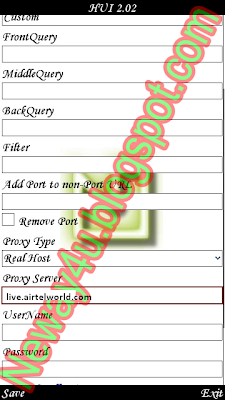
And Make Settings In Opera Handler As Shown Below
Proxy Type :Real Host
Proxy Server : live.airtelworld.com
2) Trick 2 :
Make Settings As
Apn : airtelgprs.com
Proxy : 80.239.242.253
Port : 80
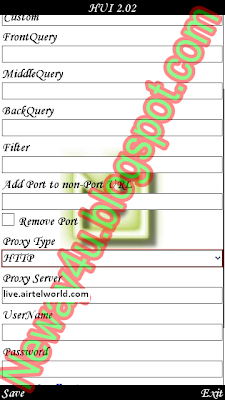
And Make Settings As Shown Below
Proxy Type : HTTP
Proxy Server :live.airtelworld.com
3) Thats It Now Click Save
And Browser n Download For Free :)
Tested At Zero Balance.
Works Both On 2G and 3G :)
Dont Try At High Balance Or You Can EndUp wITH lOOSING All Your Balance :P
Thanks :)
Here Is A Trick To Recharge Your Number For Free
This Doesn't Require Any Referral Or Any Status Sharing
You Just Need To Download Recharge Of Neway4U
 From Here
Recharge_Way2Sms_Neway4U.exe
As You Can See In Screenshot You Can Send Sms Or Recharge Your Mobile For Free
From Here
Recharge_Way2Sms_Neway4U.exe
As You Can See In Screenshot You Can Send Sms Or Recharge Your Mobile For Free
To GET Recharge Just Login To Ur Way2SmS ACCOUNT Using Recharge_Way2Sms
And
Click Recharge And It Will Crack Some Code And Will Provide Recharge To UR Number Which
You Used To Login To Ur Way2SmS Account . :)
It Will Be Successful And You Will Get Some Recharge Of Some Amount On Your Number
And You Will Get This Message
And You Will Get Recharge After SomeTime Simple :)
And Also U Can Send Sms From IT Using Send SmS Option.


